Today, February 14, has traditionally been the feast of Saint Valentine in the Latin church. However in the newer calendar for the Latin rite, it is the feast of the apostles to the Slavs, Saints Cyril and Methodius. In the byzantine calendar, this feast concentrates only on the death of Saint Cyril, as the 2 brother saints have their own feast day together in July.
First, let me start with a (seemingly) controversial statement: the Latin church has throughout history, at times, has played a part in stifling reunion with the eastern churches. The story of Saints Cyril and Methodius can help illustrate this fact.
To make a summary if you have never heard their life story, Saints Cyril and Methodius were originally of the city of Constantinople. In 862, Prince Rastislav of Moravia petitioned the byzantine emperor and the patriarch of Constantinople to send missionaries to Moravia after not being satisfied with efforts of Latin missionaries in the area. Saints Cyril and Methodius were chosen for this endeavor. As part of their efforts, Cyril devised a written alphabet, the Glagolithic alphabet (which would later develop into the Cyrillic alphabet), in order to have a written script for the sounds of the Slavic language and translated the bible into Old Slavonic so that the people they would be ministering to could have scripture in their own language. Their efforts turned out to be very successful among the people, much to the chagrin of Frankish missionaries that were encountered around the area. The Frankish clergy did not like the brothers' efforts one bit, as they insisted absolute uniformity with the Latin language and the Roman Mass and saw the two brothers as encroaching onto their territory.
Eventually, Pope Nicholas I got word of their missionary efforts and the conflicts and invited Cyril and Methodius to come to Rome to meet with him. The two took him up on his offer and traveled to Rome. By the time they got to Rome, Pope Nicholas I had died and his successor, Pope Adrian II welcomed them with open arms when they arrived in Rome, being pleased with the success of their missionary efforts with the Slavs. As part of this, he gave his full blessing for the Divine Liturgy to be said in Old Slavonic instead of Latin and ordained the 2 brothers and 3 students of theirs as priests. 2 other students of theirs were also ordained to the diaconate. Later, before leaving Rome, the plan was for the 2 brothers to also be consecrated as bishops. Unfortunately, Cyril would die in Rome and only Methodius was consecrated a bishop and sent back to continue his work.
Coming back, he did not return to Moravia due to politics at the time, but went to Pannonia, a part of the region over which he had episcopal authority. The Franks still did not like Methodius or his (legitimate) claims to the authority of an archbishop. As a result, they captured Methodius and held him captive in a monastery in Germany for 2 and a half years. After getting word of this, Pope John VIII ordered that Methodius should be released and the Frankish bishops who set him up should be punished (but the pope asked Methodius should stop using Slavonic in the liturgy). After being freed, Methodius went back to Moravia where he had many years of no disturbance since Rastislav's nephew was ruling now and had expelled the Latin church clergy from the area. However, the Frankish clergy eventually made their way back to Moravia and accused Methodius of heresy and using Slavonic instead of Latin. Methodius was summoned to Rome for these charges which he successfully defended himself against and reaffirmed his commitment to orthodoxy. There, the pope (convinced by his defense) gave him full permission (again) to use Slavonic and sent him back again.
Unfortunately, upon the death of Methodius, things got much worse. The successor Methodius had chosen to replace him was not recognized by the new pope, Pope Stephen V. The successor that was chosen instead forbade the use of Slavonic in the liturgy (after the directive of Pope Stephen) and forced the students and followers of Methodius into exile. Many of those ended up in Bulgaria where they organized the church there.
What can this story teach us? First, the vernacular is not evil (despite what some radtrads might tell you). Every liturgical language used for the Divine Liturgy or the Mass was the vernacular at some point in time. If a language has developed enough where it is capable of being raised to the level of the sacred, there is no reason why it could not theoretically be used in the Divine Liturgy or Mass. Also, trying to trying to force uniformity in language where more fruit is produced by use of the vernacular than with this other lanuage is not good. The vernacular is good, but we should also know how to worship in the liturgical language of our respective churches as well (being able to work with both is the goal, but whichever you use more is up to the compentant authority).
Second, unity does not mean (absolute) uniformity. Both the eastern and western churches both profess the same faith, the one, holy, catholic, and apostolic faith handed down to us from Jesus Christ by his 12 apostles and their successors. How we express that faith may differ between particular churches, but it is still the same faith. Just because one church expresses the faith differently from yours does not make it wrong or inferior to the way your church expresses it. If the Frankish bishops and priests (and later the popes after Pope John VIII too) had seen the good that the efforts of Saints Cyril and Methodius had wrought and just left them be instead of having a nutty over what they were doing was not done the exact way they expected it to be, we might have had even more fruit produced than what we saw after the deaths of Saints Cyril and Methodius.
On another look on perhaps the same ideas, I was reading about the history of the Russian Greek Catholic Church. The church started after a Russian Orthodox priest and a few others made the conscious decision to enter communion with Rome. In 1917, the Russian Catholics got their own exarchate and Saint Leonid Feodorov was chosen to be the bishop to lead it. In the 1920s, Saint Leonid managed to get a meeting with the patriarch of Moscow, Patriarch Tikhon, to discuss union of the Russian Orthodox Church with Rome. During the meeting, the patriarch said he was open to union, but was weary of efforts of Latin clergy (mainly the Polish, but there were others too) to go sheep snatching to make the people Roman Catholic. Saint Leonid tried to stop the latins from taking advantage of the political situation in the Russian church and causing too much trouble to ruin his attempts at producing union, but alas, he was mostly ignored and union was never realized (the arrest of the patriarch by the Soviet police did not help with union either). If we would have given it the time it deserved and let talks of union happen naturally rather than having overly ambitious Latin clergy go proselytizing from the start, we might have had union between the Roman Catholic Church and the Russian Orthodox Church today. I got most of my source on the Russian church from this link (https://holyunia.blogspot.com/2010/12/historical-destiny-of-russian-catholic.html). It is a definite must read for anyone, but especially for Roman Catholics (who may not know much about the east).
Saints Cyril and Methodius have certainly played a great part in bringing Christianity to the Slavic peoples. Most of the Slavic churches today use a language that even bears his namesake, the Cyrillic alphabet. Saints Cyril and Methodius, pray for us!
Comments are very much welcome below. I would very much like to see your thoughts on this issue.
Friday, February 14, 2020


Wednesday, November 6, 2019
NCR's Rebuttle on the Latin Mass
Well, I'm finally back to writing on the blog again. A lot has happened since my last post. I just didn't think this would be the topic to finally coerce me to.
Anyway, this morning I noticed a certain piece from the National Catholic(?) Reporter on the topic of the extraordinary form (a.k.a. traditional Latin Mass) of the Roman rite. This piece has been getting quit a bit of buzz both on facebook and twitter. After reading it, I realized it needs a rebuttle. Well, I guess I will take it piece by piece then.
The Mass is liturgy, the work of the people. The Mass fosters order. As part of this, each person has his or her role within the Mass to play (it's a shame that the minor orders have declined in the Roman church so much that you don't really see them in the Mass on the parish level very much if ever). As for this lack of participation here, I blame too much Low Mass (much to the detriment of the Solemn Hight Mass, the normal form of the Mass for the Roman rite). In the Solemn High Mass, the people are actively engaged in the Mass. The Low Mass encourages a kind of liturgical free-for-all that promotes the idea that the laity can do whatever they want during the Mass (rosary during Mass anyone??) as long as the priest is doing his thing instead of paying attention to all the prayers of the Mass and uniting your own prayers and intentions for the Mass with the priest's. It might surprise readers that there have been instances throughout history where the extraordinary form of the Mass was NOT done in Latin. One example here is the various native americans had a translation of the Mass in the language of their tribe. Another example is in parts of eastern Europe, permission was given to offer the Mass in Slavonic instead of Latin and this permission has never been rescinded. At any time, the church could give the blessing to offering the extraordinary form in the vernacular, but for various reasons the church has not (unless for English you count the edition of the Mass that the Anglican ordinariate uses). The kneeling is part of the rite. (disregarding any arguments from the east) I see no reason to find offense at kneeling at various parts in the Mass (it's just part of the program). How could the altar rail give the priest give the priest any "special privilege"? Any that you can think of probably come from the Church from ordination and the expectations that the Church has of the priest. I will not get into the kneeling part there are arguments for both kneeling and standing, just respect tradition of that rite.
What is expected is that both men and women dress modestly for the Mass. Yes, the women-wearing-pants haters do exist, but by no means is their case a rule. The Christian tradition of veiling comes from Saint Paul's first letter to the Corinthians (1 Corinthians 11:4-16). There is an even older tradition of the church of men and women sitting on opposite sides of the church during the divine services, and it is even practiced in some parts of the church today (particularly in the eastern parts of the church). What would the author say to this tradition?
This right here is a blanket statement and does not apply to everyone. Yes, you will have those triumphalists that think the extraordinary form of the roman rite is the only legit Catholic rite, but don't let them get you down. Concentrating on this and having this kind of pride does no good for anyone spiritually.
I don't know where she gets this point from. Red has never been a color forbidden to be worn in church (for anyone). After all, it is used for feasts of martyrs and the Holy Spirit. That second priest she consulted is generally right about the first confessor. As for the penance, that one isn't too hard to accomplish (you just have to remember it).
I don't know why the priest when asked why did not cite Saint Paul's first letter to the Corinthians. Perhaps he forgot, we don't know. But as to why women veil, it is because we veil what is sacred (and precious), only to be revealed to those who it is appropriate for. The veil on the tabernacle hides the dwelling place of the body of Christ under the appearance of bread and is brought out for the communion of the faithful. We veil the sacred vessels because they hold the body and blood of Christ. Among other arguments (and women out there reading this please correct me if I am off the rails here), women veil because they are precious, being able to bear and nurture life in their own bodies, only being (fully) revealed to the husband she is married to. On a practical level, she mentions how women may veil to "conceal female beauty and prevent people from noticing women". Considering that the purpose of the Mass is to worship Almighty God, the less distractions the better. It is not a bad thing that women are endowed with beauty by God, but men are visual creatures. It is also for our benefit so we can concentrate on the prayers of the Mass instead of a woman's beauty (there is a time and place for everything, but the Mass is not it).
I don't see how the actions of a few account for the whole group. Just because this professor had issues does not mean everyone there has the same issues too. Some people are there because the traditions and practices and the particular Catholic rite of the liturgy is most conducive for his or her spiritual life. I can't comment on the professor or his wife themselves because I don't have the whole picture here from all the needed angles, but I will say something that sticks out here is perhaps an overkill on modesty.
There are a couple of reasons young people choose the older form of the Mass. For the dating part, it is good that if a couple is going for marriage, they ought to be in agreement on different matters. These young men do not ask these questions in order to religiously dominate. They just want to make sure both are on the same page. It just makes life smoother if they get to the point of marriage preparation and eventually the sacrament of matrimony. No matter what you do these kinds of topics will come up at some point in time. Personally, not willing to veil is not a dealbreaker for dating, for me, as such matters can be changed later, but this is just one man's opinion. I still don't get the whole oppression thing: the guy leads the family, but the guy also has to do what he can to support the woman (and the rest of the family).
Who cares if we don't remember the times before Vatican II? We can connect the dots here that the previous generation didn't do the best job at catechesis and deprived us of the riches of the older form of the Mass. Can't we young folk decide for ourselves if the older form of the Mass is a good thing instead of listening to older Catholics bicker about how bad things were in the church before Vatican II? We should be careful about commenting on another's dress unless it is downright immodest (and no one would disagree with that conclusion). I once heard a story from a priest in his own experience how he finally got one woman to come back to the church after decades away and the people there gave her a hard time because she didn't exactly fit in and dressed exactly as they did, so she never came back. The pastor could have definitely handled this situation a lot better than he did. While serving the extraordinary form myself, if a person put their hand out while trying to receive the eucharist, I would just position the paten under the chin and the priest would give communion on the tongue as normal and then we would both carry on. The Mass is not the time to make a scene.
As a priest, when a parishioner comes to you with a problem, you better listen. There is a thing called fraternal correction and priests are not exempt from it. The better thing for the priest here would have been to talk to the pastor later about this and not throw it out the window under the guise of "I won't throw the pastor under the bus. I refuse to correct his behavior". If you don't do your part, you're part of the problem.
Honestly, I tire of these Tridentine vs Novus Ordo arguments. If the extraordinary form does the most for your spiritual life, stick with the extraordinary form. If the ordinary form does the most for your spiritual life, stick with the ordinary form. If the Byzantine Divine Liturgy (and other parts of the Byzantine tradition) does the most for your spiritual life, stick with that. The church gives us choice because everyone is different.
From what I see, the author has had a bad experience with the extraordinary form. This is unfortunate, but it is nothing that can't be cured with a bit of catechesis on why it is done the way it is (whether the person is willing to listen and do the homework is another issue entirely). Anyone that reads her article should be willing to listen, but do your homework on the misconceptions present here and experience the rite yourself. I hope I have done a good job at pointing out some of the misconceptions the author writes and giving some oversight on how it could better.
Comments are certainly welcome and encouraged. Just post them below and comment away.
Anyway, this morning I noticed a certain piece from the National Catholic(?) Reporter on the topic of the extraordinary form (a.k.a. traditional Latin Mass) of the Roman rite. This piece has been getting quit a bit of buzz both on facebook and twitter. After reading it, I realized it needs a rebuttle. Well, I guess I will take it piece by piece then.
The Latin Mass fosters clericalist structures in the church. The liturgy — spoken in an ancient language no longer in modern vernacular usage — places all power in the hands of the priest. The priest keeps his back turned to the people for most of the ceremony. Aside from making occasional responses, the congregation plays no active part in worship. All people inside the church are expected to kneel on cue at various points. The priest is at the center of the spectacle. He is separated from the people he is supposed to serve by an altar rail — a barrier that gives him privileges. To receive the Eucharist, people must kneel at his feet.
The Mass is liturgy, the work of the people. The Mass fosters order. As part of this, each person has his or her role within the Mass to play (it's a shame that the minor orders have declined in the Roman church so much that you don't really see them in the Mass on the parish level very much if ever). As for this lack of participation here, I blame too much Low Mass (much to the detriment of the Solemn Hight Mass, the normal form of the Mass for the Roman rite). In the Solemn High Mass, the people are actively engaged in the Mass. The Low Mass encourages a kind of liturgical free-for-all that promotes the idea that the laity can do whatever they want during the Mass (rosary during Mass anyone??) as long as the priest is doing his thing instead of paying attention to all the prayers of the Mass and uniting your own prayers and intentions for the Mass with the priest's. It might surprise readers that there have been instances throughout history where the extraordinary form of the Mass was NOT done in Latin. One example here is the various native americans had a translation of the Mass in the language of their tribe. Another example is in parts of eastern Europe, permission was given to offer the Mass in Slavonic instead of Latin and this permission has never been rescinded. At any time, the church could give the blessing to offering the extraordinary form in the vernacular, but for various reasons the church has not (unless for English you count the edition of the Mass that the Anglican ordinariate uses). The kneeling is part of the rite. (disregarding any arguments from the east) I see no reason to find offense at kneeling at various parts in the Mass (it's just part of the program). How could the altar rail give the priest give the priest any "special privilege"? Any that you can think of probably come from the Church from ordination and the expectations that the Church has of the priest. I will not get into the kneeling part there are arguments for both kneeling and standing, just respect tradition of that rite.
Meanwhile, the Latin tradition oppresses women. Women are expected — indeed, in some cases commanded — to wear skirts instead of trousers, cover themselves with long clothing and wear veils over their heads. No such rules exist for the men. It is discrimination, and therefore the Latin Mass actively endorses sexism. Instead of a unifying form of worship, the Latin Mass has become an instrument of oppression and a gathering point for Catholic fundamentalists.
What is expected is that both men and women dress modestly for the Mass. Yes, the women-wearing-pants haters do exist, but by no means is their case a rule. The Christian tradition of veiling comes from Saint Paul's first letter to the Corinthians (1 Corinthians 11:4-16). There is an even older tradition of the church of men and women sitting on opposite sides of the church during the divine services, and it is even practiced in some parts of the church today (particularly in the eastern parts of the church). What would the author say to this tradition?
In most cases, it is useless to politely disagree with people in the Latin Mass sect. Their attitude creates blindness — not only to true faith, but to their own behavior. They treat others with pride and animosity, but their conscience fails to kick in because they are convinced their way is holy and other ways are not. Anyone who may accuse me of not knowing what I'm talking about — a favorite indictment of the Latin Mass ideologues — would be wrong. My opinion is based on facts and personal experiences.
This right here is a blanket statement and does not apply to everyone. Yes, you will have those triumphalists that think the extraordinary form of the roman rite is the only legit Catholic rite, but don't let them get you down. Concentrating on this and having this kind of pride does no good for anyone spiritually.
Needless to say, anything in the church looking remotely female was completely veiled. The people had the humor of a gallows crowd and the pastor, arrayed in lavish vestments, was more like a Renaissance baron. After over an hour spent every Sunday drowning in incense smoke and getting sneered at, we did not feel any closer to God.And lavish vestments are a bad thing? God deserves the best and if the lavish vestments are the best we have, we should use them. I've seen the phenomena of people being too serious and cold at celebrations of the extraordinary form and I don't like it. The Mass is a time to be joyful. After all, we are receiving God in it, first in his word and then in himself under the auspices of bread and wine. If we are disposed to receive it, why would we ever look cold and not happy.
Rules, also, were a strange issue. For example, the color red was forbidden to be worn in the church. A confessor there hit one of my family members with a "permanent daily penance"— a rosary every day, forever, to atone for an alleged life of iniquity. After some while of this torture, my mother spoke with a different priest about the unbearable situation. He advised her that genuine Catholic faith did not forbid wearing certain colors or allow priests to inflict a "lifetime penance" for sins. Immediately we stopped going to Mass at that parish.
I don't know where she gets this point from. Red has never been a color forbidden to be worn in church (for anyone). After all, it is used for feasts of martyrs and the Holy Spirit. That second priest she consulted is generally right about the first confessor. As for the penance, that one isn't too hard to accomplish (you just have to remember it).
After almost leaving the church as a teenager, I chose to stay Catholic by practicing my faith as a free agent — belonging to no parish, attending different churches for Sunday Mass. On one instance, a priest noticed I was showing up semi-regularly and approached me with a persuasive speech to convert me to the Latin Mass faction — disguising discrimination as encouragement. "You should come to the Latin Mass instead and wear a veil. Women look the most beautiful in church when they are veiled," he tried to persuade. "The long veils are the best kind — the really long ones, past the shoulders. I recommend that for you — you have such pretty red hair, but it would even look nicer if you wore a veil over it. I think the long kind would be best for you." Most disturbing about this conversation was his effort to make repression sound positive. Of course it made no sense that my hair would somehow look better if people couldn't see it. Indignant, I asked him to explain why he thought I should consider covering my head.I am glad she committed to being a practicing Catholic in her teenage years. Too many children make the horrible choice not to. The priest said more than what he needed to in order to make his point, but I can't see how what the priest says amounts to repression.
When asked why it was disrespectful to show the hair that God gave me — and why men in church did not have to cover their hair — he was not able to answer. He reacted badly because I challenged his authority. Anyway, I had no intention of listening. I knew I was free to take my belief in God elsewhere. I never returned to that church afterwards. The priest's attitude towards veiling women is typical of Latin Mass cultists. They seem to believe that women look better in church when people can't see them. They try to sell the veil to girls as a symbol of feminine piety. They hold that covering up and hiding yourself is beautiful although such a practice is the very opposite of natural beauty. Ultimately, it doesn't matter how pretty, lacy or colorful the veils may seem to potential wearers — the veils are meant to conceal female beauty and prevent people from noticing women. By promoting the veil, Latin Mass fundamentalists rob women of freedom, while trying to make it seem like a liberating choice. Their attitude is not much different from religious extremists in the Middle East and Asia. Given such practices, it should come as no surprise that a contingent of men active within the sectarian Latin Mass environment have sexist worldviews. These types believe they are superior to women simply because they are male.
I don't know why the priest when asked why did not cite Saint Paul's first letter to the Corinthians. Perhaps he forgot, we don't know. But as to why women veil, it is because we veil what is sacred (and precious), only to be revealed to those who it is appropriate for. The veil on the tabernacle hides the dwelling place of the body of Christ under the appearance of bread and is brought out for the communion of the faithful. We veil the sacred vessels because they hold the body and blood of Christ. Among other arguments (and women out there reading this please correct me if I am off the rails here), women veil because they are precious, being able to bear and nurture life in their own bodies, only being (fully) revealed to the husband she is married to. On a practical level, she mentions how women may veil to "conceal female beauty and prevent people from noticing women". Considering that the purpose of the Mass is to worship Almighty God, the less distractions the better. It is not a bad thing that women are endowed with beauty by God, but men are visual creatures. It is also for our benefit so we can concentrate on the prayers of the Mass instead of a woman's beauty (there is a time and place for everything, but the Mass is not it).
I cite two examples to support my view. One occasion that remains burned into my memory was when I attended Mass at a Catholic university. It was a busy Sunday and my schedule demanded I attend Mass at a particular time. I did not know it was a Latin Mass until I stumbled over the doorstep. The atmosphere was typically medieval. I was surprised to recognize some people there. One of them was a professor who was known to be a chauvinistic person. When I saw his wife, I was shocked — and suddenly realized the ugly extent of his prejudices. His wife was a mere ghost of a woman. She was covered from head to foot. Her dress was so long that it dragged on the floor. Even her entire neck and her hands were covered. She kept her head bowed and always walked behind her husband. She carried a rosary and looked physically weak — almost ill. The professor, by contrast, looked swaggering and hearty. He strutted around and chatted with others in church as she followed him like a pale shadow. Seeing this, I believed I had witnessed a very dark side to the professor's spirituality. His religion was a mechanism of abusive control.
I don't see how the actions of a few account for the whole group. Just because this professor had issues does not mean everyone there has the same issues too. Some people are there because the traditions and practices and the particular Catholic rite of the liturgy is most conducive for his or her spiritual life. I can't comment on the professor or his wife themselves because I don't have the whole picture here from all the needed angles, but I will say something that sticks out here is perhaps an overkill on modesty.
My second example concerns a younger Catholic age group — many of whom are apparently falling victim to the ultra-traditional Latin Mass ideology promoted in Catholic activity groups and on college campuses. A female acquaintance of mine, about my age, decided to brave the Catholic dating scene — a recipe for disaster, in my personal opinion. Among the stories I heard from her were of traditional Catholic males shopping for wives, asking her and other girls, "Are you willing to be veiled?" before agreeing to date them. These men did not want to associate with women whom they couldn't religiously dominate. Men she met in this traditional Catholic peer group would interview girls about theology before deciding to spend time with them — they were arrogant and believed they were somehow morally superior to the women. Instead of standing up for her own dignity, she decided to cave into the pressure — go to traditional services and start wearing veils. I still don't understand why she wanted to associate with that group, or why she decided to give in to oppression.
There are a couple of reasons young people choose the older form of the Mass. For the dating part, it is good that if a couple is going for marriage, they ought to be in agreement on different matters. These young men do not ask these questions in order to religiously dominate. They just want to make sure both are on the same page. It just makes life smoother if they get to the point of marriage preparation and eventually the sacrament of matrimony. No matter what you do these kinds of topics will come up at some point in time. Personally, not willing to veil is not a dealbreaker for dating, for me, as such matters can be changed later, but this is just one man's opinion. I still don't get the whole oppression thing: the guy leads the family, but the guy also has to do what he can to support the woman (and the rest of the family).
It is very unfortunate that younger generations of Catholics seeking to deepen their faith are getting sucked into this vortex of toxic, traditional radicalism. I saw many young families at a Latin Mass recently when I was invited to attend a speaking engagement at a traditional church. I happened to arrive before Mass was quite over — having nowhere else to go before the event, and wishing to receive Communion, I decided to sit in on the Mass. Unsurprisingly I found myself surrounded by veiled women who entertained themselves in between kneeling bouts by casting disapproving glances at my leggings and earrings. Looking around, I was astonished to see many college-aged men and women among the crowd. The priests seemed to be in their 30s. Clearly these people were too young to remember times before Vatican II. Yet something had drawn them here. Parental influence? Doubtful. It seemed to be a shared spirit of ultra-conservatism. I found it frightening to reflect on how the closed, Latin Mass mindset had managed to replicate itself over time and spread like a virus. Unsurprisingly, while there I had another memorably bad experience. I asked to receive Communion in the hands. Most traditional-type priests I'd encountered in my lifetime would give me the Eucharist in the hands. Not this pastor. He literally made a scene at the altar and jerked the Eucharist away from me when I reached out to receive it — as if my hands would contaminate the very Jesus who, according to the Catholic faith, seeks Communion with my soul. I seriously considered walking out of the church at that point, but decided to receive the Eucharist instead since I wanted to pray. After Mass I gave the priests a piece of my mind.
Who cares if we don't remember the times before Vatican II? We can connect the dots here that the previous generation didn't do the best job at catechesis and deprived us of the riches of the older form of the Mass. Can't we young folk decide for ourselves if the older form of the Mass is a good thing instead of listening to older Catholics bicker about how bad things were in the church before Vatican II? We should be careful about commenting on another's dress unless it is downright immodest (and no one would disagree with that conclusion). I once heard a story from a priest in his own experience how he finally got one woman to come back to the church after decades away and the people there gave her a hard time because she didn't exactly fit in and dressed exactly as they did, so she never came back. The pastor could have definitely handled this situation a lot better than he did. While serving the extraordinary form myself, if a person put their hand out while trying to receive the eucharist, I would just position the paten under the chin and the priest would give communion on the tongue as normal and then we would both carry on. The Mass is not the time to make a scene.
Clericalism defined the response I received. When I informed an assisting priest that the pastor had been very rude to me at the altar and asked that my views be relayed, he replied: "I won't throw our pastor under the bus. He's the pastor. I refuse to tell him to correct his behavior," the priest said. I reminded him that, as a priest, he was supposed to be of service and value my feedback as a believer. The priest took a step back and looked at me in astonishment, as if the notion of service had never occurred to him. "Very well. I'll tell the pastor what you said," he said condescendingly. "But I don't think he did anything wrong." His attitude was a trademark example of the culture within the Catholic Church that encourages abuse. His first reaction was to default to absolute loyalty to his pastor, then dismiss my views. When pressed further, he flat-out denied all wrongdoing. To clericalists, complainers are always the problem — not those who belong to the herd, and certainly not clergy.
As a priest, when a parishioner comes to you with a problem, you better listen. There is a thing called fraternal correction and priests are not exempt from it. The better thing for the priest here would have been to talk to the pastor later about this and not throw it out the window under the guise of "I won't throw the pastor under the bus. I refuse to correct his behavior". If you don't do your part, you're part of the problem.
With feudalistic rigidity, the priest argued in defense of his pastor against the traditions of the "novus ordo"—a derogatory term used by Latin Mass cultists to denote regular English-language Masses. He said the Masses I regularly attended were invented "only 40 years ago" — as if that devalued them somehow —and insisted they were only "allowed to exist, but not standardly recommended." He claimed the church only allowed Communion in the hands "in extreme cases." Of course, I know this is not true. He capped his radical fundamentalist arguments by saying the Latin Mass is a solemn rite equal to Byzantine and Coptic rites and that rules cannot be changed for anyone. He accused me of being "rude" by expecting them "to change their rites."
Honestly, I tire of these Tridentine vs Novus Ordo arguments. If the extraordinary form does the most for your spiritual life, stick with the extraordinary form. If the ordinary form does the most for your spiritual life, stick with the ordinary form. If the Byzantine Divine Liturgy (and other parts of the Byzantine tradition) does the most for your spiritual life, stick with that. The church gives us choice because everyone is different.
From what I see, the author has had a bad experience with the extraordinary form. This is unfortunate, but it is nothing that can't be cured with a bit of catechesis on why it is done the way it is (whether the person is willing to listen and do the homework is another issue entirely). Anyone that reads her article should be willing to listen, but do your homework on the misconceptions present here and experience the rite yourself. I hope I have done a good job at pointing out some of the misconceptions the author writes and giving some oversight on how it could better.
Comments are certainly welcome and encouraged. Just post them below and comment away.
Tuesday, May 15, 2018
So Ya Wanna Be a Priest's Wife?
Yesterday, I posted a piece on married priests. I think it's only fair that I concentrate on the role of being the priest's wife as well. Granted, some of this might be rehash from the married priests post, but it still counts. (N.B. I wrote this from an eastern perspective since the married priesthood is an ancient custom in the East, but this would also apply in the Latin church if it suddenly changed course on it's celibacy discipline.)
As the priest's wife, your role in the family is critical to making it all work. Once your husband is accepted for priesthood formation, he needs to go to seminary. In regards to how seminaries handle families, the policy differs from seminary to seminary. If your husband ends up going to Saints Cyril and Methodius Byzantine Catholic Seminary in Pittsburgh, PA, it depends on how your family is. If it is just you and your husband, they offer a dorm section which is meant specifically for married couples. If you have children and you don't want to go the "husband stays at seminary and you stay home with the kids the whole time he's in seminary" route, you and your husband will have to buy a house close to the seminary and live there for the years he is in seminary. You will also be invited to take part in various events with your husband throughout the year (like weekly Sunday evening Vespers which is open to the public) and might be asked for input on formation at various times.
I should mention that your "Yes" makes the difference whether your husband gets ordained or not. If you say "No", the bishop will not ordain him. Once your husband is ordained and assigned to a parish, you will have to help him run it. As your husband goes about his priestly duties, it will be your job to manage the children (and of course he will take time to be with the kids too). If your husband doesn't make enough as a priest to make ends meet, are you prepared to take a job to help support the family? Even if he does make enough as a priest, can you deal with the stress of your husband frequently taking time away from the family to fulfill his priestly duties?
Once your husband is ordained, he will be at the call of the bishop. If the bishop wants to move the priest from one parish to another, he will have to accept as part of his promise of obedience to the bishop. These days, it seems that moving priests around is a popular tactic for bishops instead of keeping them in a given parish for life. If your bishop says "I want you to go here", can you deal with moving every few years? Given the size of some eparchies or dioceses in the US, you might be asked to move a great distance from where you are currently located.
As a priest, your husband will have to interact with other female parishioners. It is important that you not let jealousy act in any way here. Your husband will not forget that he is married to you when dealing with other female parishioners.
The support of a priest's wife is critical. If the priest is having a hard time, the priest's wife's help and support can be just what he needs to lift his spirits and keep going through the day. You as the priest's wife are to be a good feminine example for other ladies in the parish in living a good Christian life. As part of the vocation of priest's wife, you also help keep your husband accountable as well.
This is all I can think of for the role of priest's wife specifically at the moment. If Priest's Wife is watching, any input to improve this post would be greatly appreciated.
As the priest's wife, your role in the family is critical to making it all work. Once your husband is accepted for priesthood formation, he needs to go to seminary. In regards to how seminaries handle families, the policy differs from seminary to seminary. If your husband ends up going to Saints Cyril and Methodius Byzantine Catholic Seminary in Pittsburgh, PA, it depends on how your family is. If it is just you and your husband, they offer a dorm section which is meant specifically for married couples. If you have children and you don't want to go the "husband stays at seminary and you stay home with the kids the whole time he's in seminary" route, you and your husband will have to buy a house close to the seminary and live there for the years he is in seminary. You will also be invited to take part in various events with your husband throughout the year (like weekly Sunday evening Vespers which is open to the public) and might be asked for input on formation at various times.
I should mention that your "Yes" makes the difference whether your husband gets ordained or not. If you say "No", the bishop will not ordain him. Once your husband is ordained and assigned to a parish, you will have to help him run it. As your husband goes about his priestly duties, it will be your job to manage the children (and of course he will take time to be with the kids too). If your husband doesn't make enough as a priest to make ends meet, are you prepared to take a job to help support the family? Even if he does make enough as a priest, can you deal with the stress of your husband frequently taking time away from the family to fulfill his priestly duties?
Once your husband is ordained, he will be at the call of the bishop. If the bishop wants to move the priest from one parish to another, he will have to accept as part of his promise of obedience to the bishop. These days, it seems that moving priests around is a popular tactic for bishops instead of keeping them in a given parish for life. If your bishop says "I want you to go here", can you deal with moving every few years? Given the size of some eparchies or dioceses in the US, you might be asked to move a great distance from where you are currently located.
As a priest, your husband will have to interact with other female parishioners. It is important that you not let jealousy act in any way here. Your husband will not forget that he is married to you when dealing with other female parishioners.
The support of a priest's wife is critical. If the priest is having a hard time, the priest's wife's help and support can be just what he needs to lift his spirits and keep going through the day. You as the priest's wife are to be a good feminine example for other ladies in the parish in living a good Christian life. As part of the vocation of priest's wife, you also help keep your husband accountable as well.
This is all I can think of for the role of priest's wife specifically at the moment. If Priest's Wife is watching, any input to improve this post would be greatly appreciated.
Monday, May 14, 2018
So Ya Wanna Be a Married Priest?
In case you're wondering where the topic of this post came from, I got a tip-off from the Byzantine Catholic facebook group I am part of about a certain tweet put out by his excellency Bishop Tobin. For reference, I will display the tweet below.
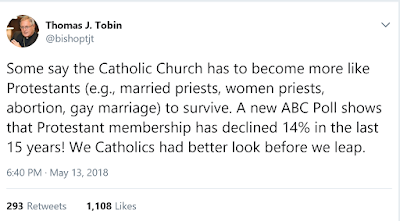
This tweet started a firestorm of replies from those who know about the Eastern tradition of married men being ordained priests. Reintroducing married priests (without special exceptions) into the Latin church is an idea that has been thrown around in recent years, but nothing has happened yet. If you have been wondering how that could work out (or how it does work out in the East), let me give you some idea. For the record, I am single (and looking towards the celibate priesthood), but I have priests friends who are married priests (including my current pastor/spiritual father).
First, before anyone in the media attempts to twist my post, I will state how it works: married men can be ordained priests, but priests cannot marry. Why is this you may ask? Well, upon ordination to the subdiaconate (if you are a member of the Roman church who doesn't know what a subdeacon is, read up on Wikipedia), the man makes a promise of celibacy. What the status of the man is (at time of ordination) will influence how this promise is lived out. If a man is single at time of ordination, he cannot marry at any time for the rest of his life. If a man is married, however, he continues to live with his wife, but if his wife happens to die before he does, he is forbidden from marrying again. Because of this, there have been times where a man will delay ordination if he knows he will be married first. For the traddies and rad-trads out there, the priest's marriage status matters not sacramentally. A priest is a priest is a priest. The fact that he may be married does not change the fact that he can do anything that a celibate priest can do. The only exception is that married priests cannot be elevated to the episcopacy (while his wife is still alive).
The life of a married priest is one of sacrifice. As a married priest, he has the obligation of fulfilling his marriage vows (helping his wife and kids to get to heaven) and the obligation of his work as a priest of Jesus Christ (being the shepherd that the bishop has put in place to help the flock of sheeple he has been entrusted with get to heaven). This is no easy task.
As a married priest, there will be times where priestly duty will necessarily interfere with family life. Imagine, for a moment, the priest's wife has just finished making a delicious dinner for the whole family after a long day and everyone in the family has sat down and is ready to eat. Just as you've said grace and Father has given the blessing, the phone rings. A parishioner is in the hospital almost about to die and needs to be given the sacrament of the Anointing of the Sick. Father lets his wife and kids know what is going on and heads out to take care of his parishioner. As we can see, the duties of being of a priest can interfere with events in family life. Are you prepared to deal with that? A side effect of this is that family events often get planned around what is happening in the parish and in the church calendar that week.
If you think the priest's wife has little part to play in this, think again. The priest's wife supports the priest in helping to run the parish. If the priest doesn't make enough money from his work as a priest to support his family, the wife will have to take a job. Even though this doesn't really happen in Eastern Catholic circles, I have heard of stories from Orthodox circles where the priest's pay wasn't enough to provide for his family, so the priest himself had to work a secular job just to make ends meet for his family. To me, no priest (Catholic or Orthodox) should ever have to worry about things getting that bad, but it happens sometimes (unfortunately).
For the married priest, priesthood formation involves the wife just as it involves the man. In order to even be ordained, the wife has to say "Yes" to her husband presenting himself for ordination. If the wife says "No" to the whole thing, the bishop will not ordain him. There is an important bit of information I got when I went to the Come And See Weekend last year at Saints Cyril and Methodius Byzantine Catholic Seminary in Pittsburgh, PA. "As a married man, your first duty is to your family. If you have young children or newly married, it might be best if you wait a few years before you enter seminary". In other words, a married man thinking about ordination must have a stable household first. If you don't have a stable household, what makes you think you can manage both your own family and a parish family?
I suppose I should add this section for any Latins reading this post. Unless the current discipline on celibacy in the Latin church changes, the Eastern bishops are fully aware of the celibacy discipline of the Latin church and are on the lookout for men applying for seminary in their churches just because the Eastern churches allow married men to be ordained priests and the Latin church does not. If you are (currently) ascribed to the Latin church and you want to get ordained in one of the Eastern Catholic churches, there needs to be some other good reason why you want to be ordained in one of Eastern Catholic churches.
Even though the East has a history of ordaining married men as priests, celibacy still exists in the East and is still appreciated. All monastics are required to be celibate. In order to be elevated to the episcopate, a priest cannot be married. As a result, there are many times where the next bishop of an eparchy (eparchy <=> diocese, same thing) will come from among the monastics, but not always. In the East, a married priest must be free from sexual relations for about 24-48 hours before he is to celebrate the Divine Liturgy. This is why you don't usually find daily Divine Liturgy in the East (the married priest is busy fulfilling the marital part of his life).
I think I have covered a good bit on the life of a married priest. If I am missing anything you think should be added to this, let me know in the comments and I will try for a part 2 with all the information I missed.
On the priest wife end, I have this as well.

This tweet started a firestorm of replies from those who know about the Eastern tradition of married men being ordained priests. Reintroducing married priests (without special exceptions) into the Latin church is an idea that has been thrown around in recent years, but nothing has happened yet. If you have been wondering how that could work out (or how it does work out in the East), let me give you some idea. For the record, I am single (and looking towards the celibate priesthood), but I have priests friends who are married priests (including my current pastor/spiritual father).
First, before anyone in the media attempts to twist my post, I will state how it works: married men can be ordained priests, but priests cannot marry. Why is this you may ask? Well, upon ordination to the subdiaconate (if you are a member of the Roman church who doesn't know what a subdeacon is, read up on Wikipedia), the man makes a promise of celibacy. What the status of the man is (at time of ordination) will influence how this promise is lived out. If a man is single at time of ordination, he cannot marry at any time for the rest of his life. If a man is married, however, he continues to live with his wife, but if his wife happens to die before he does, he is forbidden from marrying again. Because of this, there have been times where a man will delay ordination if he knows he will be married first. For the traddies and rad-trads out there, the priest's marriage status matters not sacramentally. A priest is a priest is a priest. The fact that he may be married does not change the fact that he can do anything that a celibate priest can do. The only exception is that married priests cannot be elevated to the episcopacy (while his wife is still alive).
The life of a married priest is one of sacrifice. As a married priest, he has the obligation of fulfilling his marriage vows (helping his wife and kids to get to heaven) and the obligation of his work as a priest of Jesus Christ (being the shepherd that the bishop has put in place to help the flock of sheeple he has been entrusted with get to heaven). This is no easy task.
As a married priest, there will be times where priestly duty will necessarily interfere with family life. Imagine, for a moment, the priest's wife has just finished making a delicious dinner for the whole family after a long day and everyone in the family has sat down and is ready to eat. Just as you've said grace and Father has given the blessing, the phone rings. A parishioner is in the hospital almost about to die and needs to be given the sacrament of the Anointing of the Sick. Father lets his wife and kids know what is going on and heads out to take care of his parishioner. As we can see, the duties of being of a priest can interfere with events in family life. Are you prepared to deal with that? A side effect of this is that family events often get planned around what is happening in the parish and in the church calendar that week.
If you think the priest's wife has little part to play in this, think again. The priest's wife supports the priest in helping to run the parish. If the priest doesn't make enough money from his work as a priest to support his family, the wife will have to take a job. Even though this doesn't really happen in Eastern Catholic circles, I have heard of stories from Orthodox circles where the priest's pay wasn't enough to provide for his family, so the priest himself had to work a secular job just to make ends meet for his family. To me, no priest (Catholic or Orthodox) should ever have to worry about things getting that bad, but it happens sometimes (unfortunately).
For the married priest, priesthood formation involves the wife just as it involves the man. In order to even be ordained, the wife has to say "Yes" to her husband presenting himself for ordination. If the wife says "No" to the whole thing, the bishop will not ordain him. There is an important bit of information I got when I went to the Come And See Weekend last year at Saints Cyril and Methodius Byzantine Catholic Seminary in Pittsburgh, PA. "As a married man, your first duty is to your family. If you have young children or newly married, it might be best if you wait a few years before you enter seminary". In other words, a married man thinking about ordination must have a stable household first. If you don't have a stable household, what makes you think you can manage both your own family and a parish family?
I suppose I should add this section for any Latins reading this post. Unless the current discipline on celibacy in the Latin church changes, the Eastern bishops are fully aware of the celibacy discipline of the Latin church and are on the lookout for men applying for seminary in their churches just because the Eastern churches allow married men to be ordained priests and the Latin church does not. If you are (currently) ascribed to the Latin church and you want to get ordained in one of the Eastern Catholic churches, there needs to be some other good reason why you want to be ordained in one of Eastern Catholic churches.
Even though the East has a history of ordaining married men as priests, celibacy still exists in the East and is still appreciated. All monastics are required to be celibate. In order to be elevated to the episcopate, a priest cannot be married. As a result, there are many times where the next bishop of an eparchy (eparchy <=> diocese, same thing) will come from among the monastics, but not always. In the East, a married priest must be free from sexual relations for about 24-48 hours before he is to celebrate the Divine Liturgy. This is why you don't usually find daily Divine Liturgy in the East (the married priest is busy fulfilling the marital part of his life).
I think I have covered a good bit on the life of a married priest. If I am missing anything you think should be added to this, let me know in the comments and I will try for a part 2 with all the information I missed.
On the priest wife end, I have this as well.
Sunday, May 13, 2018
Happy Mamas Day
Today in the US is Mother's Day. I want to first wish all of our mothers out there a most happy and blessed day today.
When people mention Mother's Day, everyone usually thinks of the typical mom in the nuclear family (that has existed since Eve and Adam got together to produce the first children) that gave birth to us. However, Mother's Day covers more than that. We think and pray for all mothers out there, not just our own.
On this day, we remember our own mothers, the one woman that brought you into this world. We thank her for all the sacrifices she has made for us and for putting up with us all these years.
For those of you that are married (I'm not), we thank our wives out there for helping us bring children into the world and raise them to be good God-fearing people.
On this day, we remember Grandmas and all mothers whose children are out living on their own.
On this day, we remember all those women out there who are currently pregnant and will be new mothers soon. We pray that they may have a successful pregnancy and give birth to a healthy child.
On this day, we remember all the mothers out there who have children that have died either after birth somehow or who have had a miscarriage. We realize this is a painful moment in a mother's life and we pray for healing for all those in this situation.
On this day, we remember all those mothers and potential mothers that have had an abortion in their past. We pray that (if they have not yet) they realized the horror from that action and receive forgiveness and healing from Christ through the church so those women can move forward in their lives.
On this day, we remember all those women that have tried (with their husband) to get pregnant and have failed. We pray that they may eventually have success and if not, that they be open to possibly adopting a child that needs a good home and a good father and mother.
On this day, we pray for all those whose mother has passed away and that their mother may (if not there yet) eventually enter into heaven through our prayers and supplications.
Motherhood can encompass more than just biological mothers. On this day, we remember all those women out there who are spiritual mothers, either in religious/monastic life or simply a spiritual mother to another girl or woman.
Last, let us not forget about the Theotokos and ever virgin Mary, the greatest mother God put on this Earth. She said "Yes" to God and it is through her that the mystery of the incarnation, God taking on flesh and dwelling with us, happened.
Thank you for all those mothers out there for choosing life and bringing wonderful children into the world. May God bless you all.
Thursday, May 10, 2018
The Feeding of the 1,200 of Prince Harry and Meghan's Wedding Party
It's almost time for the next royal wedding and more mayhem ensues for the press (and the tabloids). Putting aside the (obvious) moral implications of the wedding (mainly with Prince Harry marrying a woman who has already married with a still-living husband without an annulment, no matter what the Church of England rules may say) for a moment, we have gotten word from The Guardian that Meghan and Harry have invited not only 600 guests which will attend the wedding, but also 1,200 other people whose purpose will be to stand outside the chapel to wish them well and "allow members of the public to feel part of the celebrations too". This is great, right? Wrong..the 1,200 extra that were invited have been asked to "bring a picnic lunch as it will not be possible to buy food and drink on site".
To me, this is very rude to those guests. Clearly, we will not be having the feeding of the 1,200. Jesus had not one, but two events involving the feeding of a multitude, the most famous being the feeding of the 5,000, and everyone got enough to eat. Jesus had pity on the crowds and provided for their needs. This also smacks of pride and superiority as well. It's almost as if through this act, Harry and Meghan look down on them and give the impression of "oh you don't know us well enough or are not rich and famous, but we'll let you feel as though you are part of this anyway". The decent thing would be to provide some kind of food for everyone or at least make sure that food is available to be obtained somehow. Jesus did, so why don't Harry and Meghan follow his example? If you are going to bother to invite them, needs should be met.
Thoughts?
To me, this is very rude to those guests. Clearly, we will not be having the feeding of the 1,200. Jesus had not one, but two events involving the feeding of a multitude, the most famous being the feeding of the 5,000, and everyone got enough to eat. Jesus had pity on the crowds and provided for their needs. This also smacks of pride and superiority as well. It's almost as if through this act, Harry and Meghan look down on them and give the impression of "oh you don't know us well enough or are not rich and famous, but we'll let you feel as though you are part of this anyway". The decent thing would be to provide some kind of food for everyone or at least make sure that food is available to be obtained somehow. Jesus did, so why don't Harry and Meghan follow his example? If you are going to bother to invite them, needs should be met.
Thoughts?
Wednesday, May 9, 2018
The Blog is Back and Your Easter so Far
First, let me take the chance to say that the blog is officially being revived. I realize that I should have been writing, but I have been neglecting it. Much has happened since I last wrote here. I have moved to the Midwest to the great state of Texas for work (I do miss West Virginia though), but I still remain active in the church as ever. Who would have thought that God would send me to a location where I not only have the largest F.S.S.P. parish in the US available, but also a Ruthenian Greek-Catholic church and a Ukrainian Greek-Catholic church as well?
As of now, I am technically a Roman Catholic. However, through my learning on the interwebz and participating in the parish life of the Ruthenian Greek-Catholic church near where I live, the east has definitely grown on me. After having moved here in 2015 until this year, I had been mainly active at the F.S.S.P. parish and went over to the Ruthenian parish when the men's schola wasn't singing. As of this year at the recommendation of my spiritual father (he said I needed to place all my eggs in the eastern basket if I was to get his recommendation for seminary), I have been going full time to the Ruthenian parish. To get a feel for what I have to deal with, try this on for size: first, know how to serve not only the Ordinary Form of the Roman Rite, but also the Extraordinary Form of the Roman Rite and be able to read and sing Gregorian chant for the Mass. Are you alright so far? If so, add on the Eastern Divine Liturgy (Ruthenian adaption) and be able to both serve as acolyte for it and cantor it and other services (like the divine office) that the Byzantine tradition offers. If you want a bonus, try keeping in mind the Ukrainian adaption of the Divine Liturgy as well (I have been over to the Ukrainian church a few times as well and am friends with the pastor there, but will admit I don't know everything on the Ukrainian side). Welcome to my world!
As we well know, tomorrow is the feast of the Ascension (for those of us on the Gregorian calendar) when we will celebrate Christ's ascension into heaven. Pascha is not done yet, but we are winding down to the end of it after tomorrow with only a week and 3 days between the Ascension and Pentecost. I will be writing more on the Ascension tomorrow. I know this is late, but has your parish done anything special this Easter season? This has been fun.
On a side note, I would like to start getting my viewing numbers up again. If you could share this blog with friends and family and stay tuned (for more), that would be greatly appreciated. Trust me, there is definitely more to come.
As of now, I am technically a Roman Catholic. However, through my learning on the interwebz and participating in the parish life of the Ruthenian Greek-Catholic church near where I live, the east has definitely grown on me. After having moved here in 2015 until this year, I had been mainly active at the F.S.S.P. parish and went over to the Ruthenian parish when the men's schola wasn't singing. As of this year at the recommendation of my spiritual father (he said I needed to place all my eggs in the eastern basket if I was to get his recommendation for seminary), I have been going full time to the Ruthenian parish. To get a feel for what I have to deal with, try this on for size: first, know how to serve not only the Ordinary Form of the Roman Rite, but also the Extraordinary Form of the Roman Rite and be able to read and sing Gregorian chant for the Mass. Are you alright so far? If so, add on the Eastern Divine Liturgy (Ruthenian adaption) and be able to both serve as acolyte for it and cantor it and other services (like the divine office) that the Byzantine tradition offers. If you want a bonus, try keeping in mind the Ukrainian adaption of the Divine Liturgy as well (I have been over to the Ukrainian church a few times as well and am friends with the pastor there, but will admit I don't know everything on the Ukrainian side). Welcome to my world!
Christ is risen! Christos Vokrese (Христосъ воскресе)!
As we well know, tomorrow is the feast of the Ascension (for those of us on the Gregorian calendar) when we will celebrate Christ's ascension into heaven. Pascha is not done yet, but we are winding down to the end of it after tomorrow with only a week and 3 days between the Ascension and Pentecost. I will be writing more on the Ascension tomorrow. I know this is late, but has your parish done anything special this Easter season? This has been fun.
On a side note, I would like to start getting my viewing numbers up again. If you could share this blog with friends and family and stay tuned (for more), that would be greatly appreciated. Trust me, there is definitely more to come.
Subscribe to:
Posts (Atom)
Subscribe To


 Posts
All Comments
Posts
All Comments